Why Pending Is the Minimalist Display Font You’ve Been Overlooking
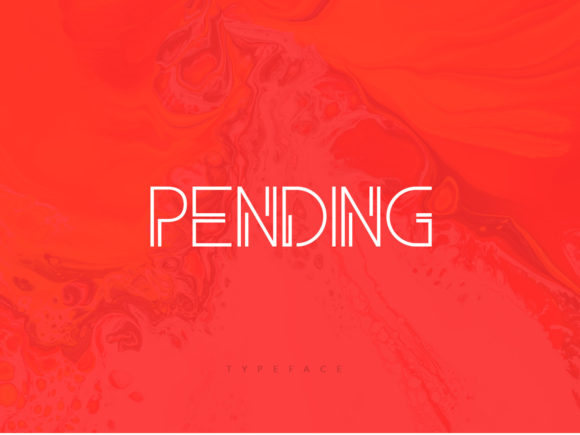
In a digital landscape saturated with ornate scripts, heavy grotesques, and complex serif pairings, finding a typeface that commands attention without shouting can feel like searching for a needle in a haystack. This is where Pending steps in. As a minimal and techno-looking display font, it offers a sleek, modern aesthetic that bridges the gap between industrial precision and contemporary elegance. However, simply downloading a font file and slapping it on a design doesn’t guarantee success. Many creators make critical errors when integrating specialized display fonts into their workflows, often resulting in designs that look cluttered, unprofessional, or difficult to read.
The appeal of Pending lies in its versatility. It is designed to match an incredibly large set of projects, ranging from tech startup branding to high-end editorial layouts. Yet, its strength—its stark, clean lines—can also be its weakness if not handled with care. Understanding how to leverage this specific typographic personality is essential for anyone looking to elevate their visual communication. Below, we explore common pitfalls associated with using minimalist techno fonts and provide practical advice on how to avoid them, ensuring your projects stand out for all the right reasons.
Understanding the Aesthetic: What Makes Pending Unique?
To use any font effectively, you must first understand its character. Pending is not merely a "sans-serif"; it carries a distinct technological DNA. Its geometric construction and sharp angles evoke a sense of futurism and efficiency. This makes it particularly effective for industries that value innovation, speed, and clarity, such as software development, cybersecurity, fintech, and modern architecture.
However, this aesthetic comes with a caveat. Because Pending is a display font, it is intended for headlines, titles, and short bursts of text rather than body copy. Using it for long paragraphs will quickly fatigue the reader’s eye. The lack of traditional serifs and the tight spacing inherent in many techno fonts require generous whitespace to breathe. If you attempt to crowd Pending with dense blocks of text, the minimalist intent is lost, replaced by visual noise.
Common Mistake #1: Ignoring Hierarchy and Scale
One of the most frequent errors beginners make is treating all text elements equally. When using a striking font like Pending, it naturally draws the eye. If you use it alongside other bold or loud typefaces, you create competition rather than harmony. The mistake here is failing to establish a clear visual hierarchy.
The Correction: Let Pending be the hero. Pair it with a neutral, highly legible sans-serif or a classic serif for body text. For example, if you are designing a landing page for a new app, use Pending for the main headline ("The Future of Finance") and a simple, clean font like Inter or Roboto for the explanatory paragraphs. This contrast ensures that the technological vibe of Pending is highlighted without compromising readability. Always ask yourself: does this element need to shout, or does it need to whisper? Pending shouts; let everything else listen.
Common Mistake #2: Poor Color Contrast and Background Clashing
The "techno" look often pairs well with dark modes, neon accents, or monochromatic palettes. However, low-contrast combinations can render Pending illegible, especially on mobile devices. A light gray Pending font on a white background might look subtle in a mockup but fail miserably in real-world usage due to poor accessibility standards.
The Correction: Prioritize accessibility from the start. Ensure that your text meets WCAG (Web Content Accessibility Guidelines) contrast ratios. If you are using Pending in a dark theme, opt for pure white or a very light silver rather than a muted gray. Conversely, if you are placing it on a busy image, use a solid overlay or drop shadow to ensure the letters pop. The minimal nature of the font means there is less "ink" to catch the eye, so color contrast becomes even more critical.
Evaluating Licensing and Usage Rights
Before you integrate Pending into a commercial project, it is vital to verify the licensing terms. Fonts are software, and misuse can lead to legal complications. Many users assume that because a font looks professional, it is free for commercial use, which is rarely the case. Some licenses restrict the number of impressions, the type of media (web vs. print), or the duration of use.
- Check the License Type: Determine if you need a Desktop license, Webfont license, or App Embedding license. Each serves a different purpose and has different cost structures.
- Commercial vs. Personal Use: Even if you are a freelancer working on a small business logo, this counts as commercial use. Ensure your purchase covers the intended application.
- Modification Rights: Some licenses prohibit altering the font files (e.g., changing kerning or creating custom ligatures). If you plan to tweak Pending to fit a specific brand identity, confirm that modification is permitted.
Failing to check these details can result in unexpected costs or takedown notices later. It is always better to invest in a proper license upfront than to deal with compliance issues after a campaign has launched.
Technical Implementation: Web vs. Print
Whether you are designing for the screen or for paper, the technical execution of Pending matters. In web design, loading times and rendering quality are paramount. Techno fonts often have unique glyph shapes that may not render perfectly across all browsers if the font file is not optimized.
For Web Design: Use WOFF2 formats for best performance. Consider using @font-face rules efficiently and subset your fonts if possible to reduce file size. Test how Pending renders on different operating systems (macOS vs. Windows) as anti-aliasing differences can affect the crispness of the techno edges.
For Print: Ensure you have sufficient resolution (300 DPI minimum). Because Pending relies on clean lines, any pixelation or blur will be immediately apparent. Also, pay attention to tracking (letter-spacing). Techno fonts often benefit from slightly increased tracking to enhance their airy, futuristic feel. Tight tracking can make the letters collide visually, defeating the purpose of the minimal design.
Strategic Application: Where Pending Shines
To truly appreciate Pending, apply it strategically. Here are a few realistic scenarios where this font excels:
- Tech Product Launches: Use Pending for the product name and tagline. The sharp lines convey precision and cutting-edge technology.
- Event Posters: For music festivals, tech conferences, or art exhibitions, Pending adds a modern edge that feels both curated and dynamic.
- Personal Branding: Freelancers and consultants in creative fields can use Pending for their logo or portfolio headers to signal professionalism and modernity.
Conversely, avoid using Pending for industries that rely heavily on tradition, warmth, or heritage, such as law firms, bakeries, or historical museums. In those contexts, the cold, clinical feel of a techno font may alienate your audience. Context is king in typography.
Final Thoughts: Making Pending Work for You
Pending is more than just a font; it is a design statement. It signals that you are forward-thinking, organized, and detail-oriented. By avoiding common mistakes related to hierarchy, contrast, licensing, and technical implementation, you can harness its full potential. Remember to balance its bold presence with supportive elements, respect its limitations as a display font, and always prioritize the user experience.
Add Pending to your creative toolkit, but do so with intention. Notice how it transforms your projects from ordinary to extraordinary. Whether you are a seasoned designer or just starting out, mastering the nuances of fonts like Pending will significantly enhance your ability to communicate effectively in a crowded digital world. Start experimenting today, but start smart.